

You can verify your age on Discord using one of four methods: on-device facial age estimation, a government ID scan plus selfie, a Google Wallet ID pass, or credit card check. Discord itself never receives your biometric data or identity documents — only your confirmed age group. Once verified, age-restricted servers, channels, and content become accessible, and your confirmed status appears under User Settings > My Account > Age Group.
The fastest routes to get access:
- Facial age estimation: Open the Discord prompt, allow camera access, follow the on-screen framing guide, and let the on-device model run. Completes in seconds with no data leaving your device.
- Google Wallet ID pass: Select the Google Wallet option in the prompt, authorize Discord to read your birthdate from your saved Passport ID, and confirm. Discord receives only your age group.
- Credit card check: Enter your card details through the in-app prompt routed via k-ID and Stripe. Discord receives an adult/non-adult result; a small temporary authorization hold may appear and is fully refunded within 14 business days.
After any successful method, Discord sends a system DM confirming "Age Check Complete" and your account reflects the adult age group immediately.
Table of Contents
- When does Discord ask you to verify your age?
- What are the four age assurance methods on Discord?
- How to complete an ID scan plus selfie on Discord
- How to verify your age on Discord using Google Wallet
- How to use credit card verification on Discord
- What to do when age assurance fails or locks your account
- How does Discord handle your privacy and data during age checks?
- Where do you see your verified age group after completing the check?
- What is Discord's rollout timeline for 2026?
- Key Takeaways
- Why privacy-forward verification matters for communities like ours
- Mellozone: a moderated 18+ space built for the fandom
- Useful sources and official Discord pages
When does Discord ask you to verify your age?
Discord's internal machine-learning model assigns an age group to the vast majority of accounts automatically, using signals like account age, server memberships, activity patterns, and whether a payment method is on file. Message content is never analyzed. Because of this, over 90% of users will never see a verification prompt at all.
You are most likely to be prompted when you:
- Attempt to join or view an age-restricted server or channel
- Try to unblur sensitive or age-gated content
- Toggle off Message Requests or other teen-safety defaults
- Use an age-restricted command or bot interaction
- Change account settings that Discord's model flags as inconsistent with a confirmed adult profile
"Age assurance is designed to apply the right protections to the right people. Most users will continue using Discord exactly as they do today." — Discord press release on the teen-by-default rollout
If you decline verification, your account stays active. You keep access to your servers, friends list, DMs, and voice channels. The only thing that changes is access to age-restricted features — those remain locked until you complete a check.
The in-product prompt typically appears as a modal dialog with a brief explanation and a "Verify Age" button. On mobile, it may appear as a full-screen overlay when you tap into a restricted channel.
What are the four age assurance methods on Discord?

Discord's age assurance toolkit currently offers four distinct methods. Each one reaches the same result — a confirmed adult age group on your account — but they differ in speed, privacy profile, and accessibility.
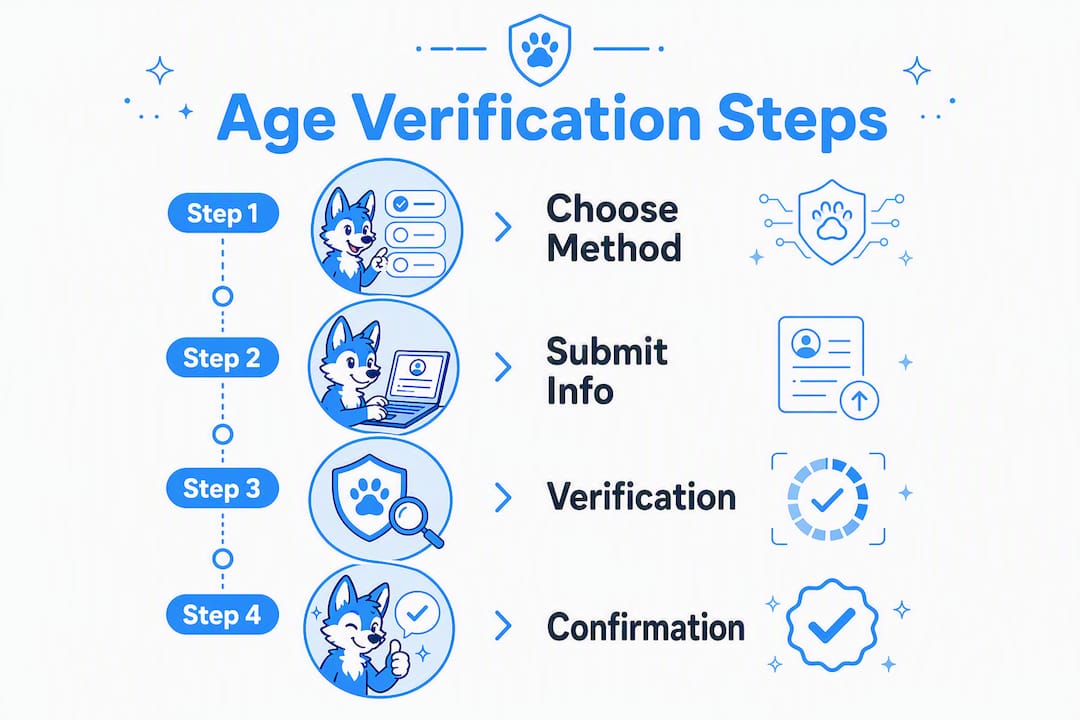
| Method | What you do | Typical speed | Does biometric/ID leave your device? | Best for |
|---|---|---|---|---|
| On-device facial age estimation | Allow camera; follow framing guide | Seconds | No — processed entirely on-device | Privacy-sensitive users; no ID available |
| Government ID + selfie | Photograph your ID; take a matching selfie | 1–5 minutes | Yes — processed by a vendor (e.g., Incode), then deleted | Users with a valid government ID who want a reliable fallback |
| Google Wallet ID pass | Authorize Discord to read birthdate from saved Passport ID | Seconds | No — Discord reads only your age group | Android users with a Passport ID already in Google Wallet |
| Credit card check | Enter card details; complete authorization prompt | Under 1 minute | Card data goes to k-ID and Stripe; Discord receives only result | Users without a government ID or Google Wallet pass |
A few things worth knowing before you choose. The facial estimation method is the most private option by design: Discord requires any facial age-estimation partner to run the model entirely on-device, so no video or image is transmitted. The ID + selfie route involves vendors like Incode, which process the document server-side and delete it after confirmation. Google Wallet is currently in testing and may not appear for all users. Credit card verification runs through k-ID and then Stripe, so your card number never touches Discord's servers directly.
How to complete an ID scan plus selfie on Discord
This method is the most widely available fallback when facial estimation is unavailable or fails. Before you start, gather a valid government-issued photo ID (passport, driver's license, or state ID) and make sure your camera permissions are enabled for the Discord app.
- Open the age assurance prompt in Discord (either from a restricted channel or via User Settings > My Account > Age Group > Verify).
- Select Scan your ID from the method options.
- Hold your ID flat under even lighting. Avoid shadows across the text or photo area — this is the most common reason for rejection.
- Follow the on-screen framing guide to align your ID within the capture box, then tap to photograph.
- When prompted, take a selfie. Look directly at the camera, keep your face well-lit, and remove glasses if the guide suggests it.
- Review the captured images on-screen and tap Submit.
- The vendor (such as Incode) processes the document and selfie, confirms your age group, and deletes the images. Discord receives only the result.
Common rejection reasons and fixes:
- Blurry photo: Tap the screen to focus before capturing. Use a flat surface rather than holding the ID in your hand.
- Mismatched selfie: Ensure your face matches the ID photo as closely as possible. Remove hats and heavy filters.
- Unsupported ID type: Discord currently supports passports, national ID cards, and driver's licenses in most regions. Student IDs and library cards are not accepted.
- Expired document: The ID must be currently valid.
Pro Tip: Place your ID on a dark, non-reflective surface and photograph it under natural daylight or a diffused lamp. Overhead fluorescent lighting creates glare that the vendor's scanner often reads as a failed capture.
How to verify your age on Discord using Google Wallet
This option is the fastest method for Android users who already have a Passport ID saved in Google Wallet. Discord reads only your birthdate from the pass — no other fields are shared.
Before starting, open Google Wallet and confirm you have a Passport ID pass saved and active. If you do not have one, you will need to add your passport through the Google Wallet app first.
- Open the age assurance prompt in Discord
Compatibility notes: This method is currently in limited testing and may not appear for all users. It is primarily available on Android. iOS users may not see the Google Wallet option in their prompt. If the option does not appear, use facial estimation or the ID scan method instead. Discord has indicated that more method options will be available before the full global rollout in the second half of 2026.
How to use credit card verification on Discord
The credit card method is a practical option for users who lack a government ID or a Google Wallet pass. The flow is straightforward, but a small temporary authorization hold may appear on your bank statement.
- Open the age assurance prompt in Discord
Discord does not store your full card number. The data passes through k-ID and Stripe, both of which operate under standard payment-industry data-handling rules. If you see a hold and it has not cleared after 14 business days, contact your bank first, then Discord support.

What to do when age assurance fails or locks your account
Verification failures fall into two categories: a method that did not complete successfully, and an account that has been locked because Discord's model incorrectly classified you as underage.
If a method fails mid-flow:
- Look for a Retry button in the Discord system message or navigate to User Settings > My Account > Age Group > Retry.
- Switch to a different method. If facial estimation failed, try the ID scan. If the ID scan failed, try the credit card option.
- Check lighting, camera focus, and ID validity before retrying.
- Make sure the Discord app is updated to the latest version — older builds sometimes have camera integration issues.
If your account is locked:
- Log into your account (you can still access the login screen even when locked).
- Navigate to Active Violations in your account settings.
- Find the Minimum Age Requirements card and tap Let us know.
- Follow the prompts to scan your government ID and take a selfie. This is the appeal path, not a standard verification — it goes to a human review queue.
- Include screenshots of any error messages you received and note the approximate time the lock occurred. This helps the review team resolve the case faster.
Response times for appeals are not publicly specified by Discord, but the Help Center recommends patience and notes that the review is manual. If you do not hear back within a few business days, you can follow up through Discord's support ticket system.
How does Discord handle your privacy and data during age checks?
Discord's age assurance system is built around a clear principle: the platform itself should receive as little personal data as possible. Here is how that works in practice across each method and vendor.
| Data type | Who processes it | Does it leave your device? | What Discord receives | Retention |
|---|---|---|---|---|
| Video selfie (facial estimation) | On-device model (vendor-supplied) | No | Age group only | Not stored — never transmitted |
| Government ID + selfie | Vendor (e.g., Incode) | Yes — sent to vendor server | Age group only | Deleted by vendor after confirmation |
| Google Wallet birthdate | Google Wallet / Google | No — Discord reads only age group | Age group only | Not stored by Discord |
| Credit card details | k-ID, then Stripe | Yes — sent to payment processor | Adult/non-adult result | Not stored by Discord |
Discord has committed to publishing documentation for every verification vendor it uses and requires all facial age-estimation partners to run inference entirely on-device. Vendors must pass a security and privacy review before being approved, and they are contractually required to delete identity documents after confirming your age group.
The internal age inference model that handles most accounts uses only account-level signals — account age, server memberships, activity patterns, and payment method presence. It does not read your messages.
If you want to know what a specific vendor holds about you, you can contact that vendor directly. Discord's Age Assurance FAQ lists the vendors involved and their data practices. For Mellozone's own approach to member data, the Mellozone Privacy Center explains how community metadata is handled separately from Discord's verification process.
Where do you see your verified age group after completing the check?
Once verification completes successfully, Discord sends a system DM with the message "Age Check Complete." Your confirmed age group then appears under User Settings > My Account > Age Group.
To confirm your status:
- Open Discord and tap your avatar or go to User Settings.
- Select My Account.
- Scroll to the Age Group section. It will display your confirmed category (adult).
- If you want to re-verify or change your result, tap Retry or Verify Again from this same screen.
What changes after adult confirmation:
- Age-restricted servers and channels become joinable and visible.
- Sensitive or blurred content can be unblurred through your content settings.
- Teen-safety defaults (such as restricted Message Requests) can be toggled off if you choose.
- Certain age-restricted bot commands and interactions become available.
What stays exactly the same:
- Your existing servers, friends list, DMs, and voice channels are unaffected whether you verify or not.
- Your username, account history, and settings outside of age-gated features remain unchanged.
- If you decline verification entirely, your account continues to function normally — you simply cannot access age-restricted content or change teen-protective defaults.
Re-verification follows the same in-app flow. If your age group ever shows incorrectly after a successful check, the appeal path described in the previous section applies.
What is Discord's rollout timeline for 2026?
Discord originally planned to require age assurance globally in March 2026. After significant user feedback, the company announced a delay until the second half of 2026 to expand verification options, improve vendor transparency, and publish detailed technical documentation.
Key points on the current timeline:
- H2 2026 global expansion: — Discord plans to scale age assurance globally in the second half of 2026. More method options and vendor documentation will be published before that rollout begins.
Security commentators have noted that Discord's staged approach — automated inference first, manual verification only when needed — is a practical model for platforms navigating evolving global online-safety laws without disrupting the majority of legitimate adult users.
Key Takeaways
Discord's age assurance system confirms your adult status through one of four privacy-forward methods, with over 90% of users never prompted and identity documents deleted by vendors immediately after confirmation.
| Point | Details |
|---|---|
| Four methods available | Facial estimation, ID + selfie, Google Wallet pass, and credit card — each reaches the same result with different privacy tradeoffs. |
| Most users won't be asked | Discord's internal model handles over 90% of accounts automatically; only edge cases trigger a user-facing prompt. |
| Your data stays protected | Biometric data never leaves your device; ID documents are deleted by vendors after confirmation; Discord receives only your age group. |
| Appeals path is documented | Locked accounts can appeal via Active Violations > Minimum Age Requirements > Let us know, using an ID scan for manual review. |
| Mellozone requires adult verification | Mellozone's 18+ Discord community applies its own moderation layer on top of Discord's age assurance — joining requires confirmed adult status. |
Why privacy-forward verification matters for communities like ours
Discord's approach to age assurance gets something genuinely right that most platforms miss: the goal is not to collect as much identity data as possible, but to collect as little as needed to confirm a single fact. On-device facial estimation, vendor deletion requirements, and the confidence-based model that handles most accounts quietly — these are real design choices, not marketing language.
What I find underappreciated in most coverage of this rollout is the appeal path. The documented route through Active Violations is clear and functional, but most users who get incorrectly locked out never find it. They assume the lock is permanent, abandon the account, and lose years of community history. Sharing that path clearly is one of the most useful things a guide like this can do.
For communities like Mellozone, age verification is not just a compliance checkbox. Running an 18+ space means the moderation team needs confidence that members are adults — not because of distrust, but because the community's tone, content, and safety norms are built around that shared context. Discord's age assurance, when it works as designed, makes that easier to maintain without putting the burden of ID collection on community moderators.
The delay to H2 2026 is actually a good sign. It suggests Discord is taking vendor transparency seriously rather than rushing a system that affects real people's access to their communities. More method options and published vendor documentation will make the system more trustworthy for everyone.
Mellozone: a moderated 18+ space built for the fandom
If you have completed Discord's age assurance and you are looking for a community that takes both safety and creativity seriously, Mellozone is worth a look. It is a free, moderated 18+ hub built specifically for furries, artists, gamers, and VRChat fans who want a low-drama space with real events and active leadership.
Mellozone runs gaming nights, art sharing sessions, and VRChat meetups, all within a server structure that requires confirmed adult status to join. The moderation team applies its own community verification layer on top of Discord's age assurance, so every member has cleared both checks before accessing community spaces. That two-layer approach keeps the environment consistent and welcoming for everyone.
Ready to see what the community looks like? Visit Mellozone and check out the membership details. If you have questions before joining, the Ask Mello Zone page connects you directly with the team.
Useful sources and official Discord pages
These are the primary sources used throughout this guide. Each one is maintained by Discord or a credible industry outlet and covers a specific aspect of the age assurance system.
- Getting global age assurance right: what we got wrong and what's changing — Discord Blog: Discord's transparency post acknowledging early communication missteps, the vendor privacy bar, and the commitment to publishing vendor documentation.
- Discord delays global rollout of age verification after backlash — TechCrunch: News coverage of the March 2026 delay announcement and user feedback context.
- Discord delays age verification to 2026 — Bitdefender Hot for Security: Industry commentary on Discord's staged approach and its relevance to broader platform online-safety compliance trends.