
Running a safe 18+ virtual meetup on Discord or VRChat comes down to five non-negotiable steps: publish written rules with explicit consequences, enable platform safety features (AutoMod, server verification, instance controls), verify that every attendee is 18+, staff a trained mod team before the event starts, and collect evidence before you delete anything. The escalation rule is simple: mute or time-out first, kick if the behavior continues, ban for severe or repeated violations, and report to platform Trust & Safety whenever the incident crosses into harassment, threats, or illegal content.
Your pre-event safety checklist:
- Set written community rules in a dedicated rules channel and reference both Discord Community Guidelines and VRChat Community Guidelines
- Enable Discord's server verification level (phone-verified or higher) and AutoMod keyword filters
- Gate 18+ channels and events behind a verified role using your verification process
- Assign at least two active moderators per event with kick/ban permissions
- Collect user IDs in Developer Mode and screenshot evidence before banning or deleting messages
Table of Contents
- How moderators should act, escalate, and log incidents
- How to collect evidence and report to Trust & Safety
- What bystanders and moderators should do in the moment
- Recording consent, doxxing prevention, and privacy rules
- Which Discord and VRChat settings should you enable before a meetup?
- Ready-to-copy templates: incident report, onboarding, and appeals
- Key Takeaways
- Why the "set it and forget it" approach to moderation fails
- Mello Zone Furry Community has the resources you need
- Useful sources and emergency contacts
- FAQ
How moderators should act, escalate, and log incidents
Consistent moderation starts with a shared framework. Without one, two moderators handling the same infraction will reach different outcomes, and that inconsistency erodes member trust.
Infraction matrix:
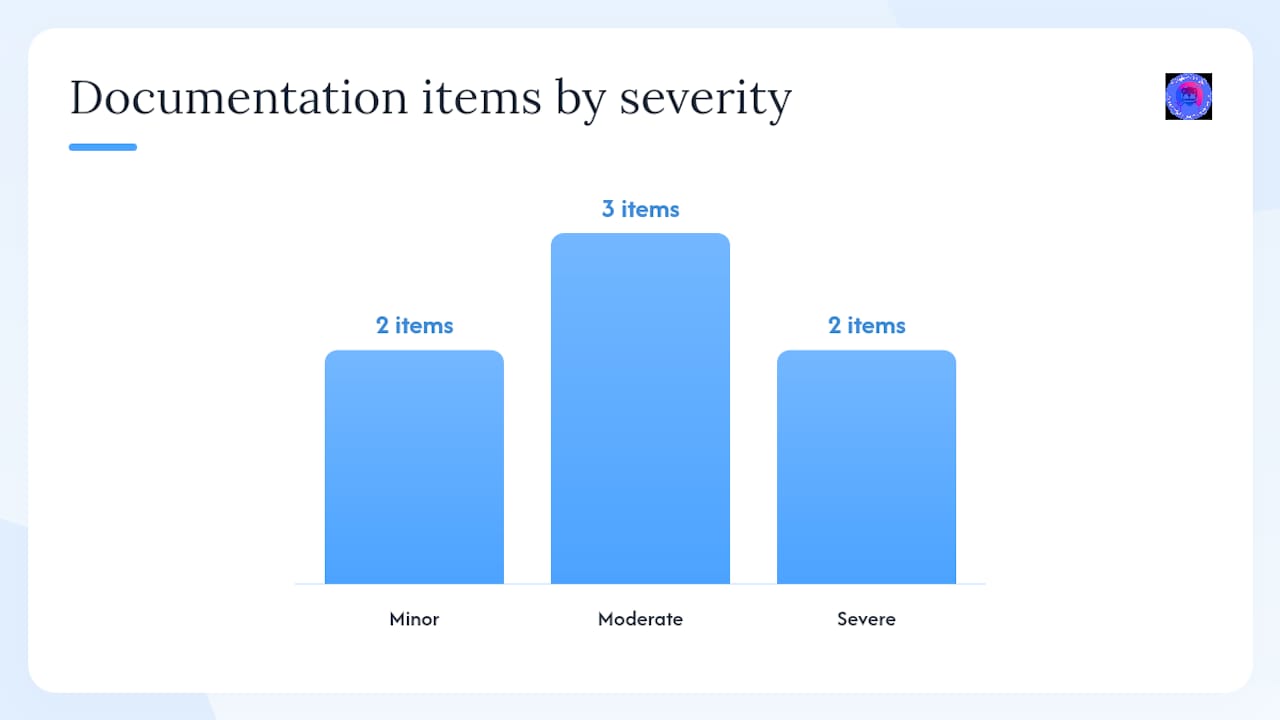
- Minor (off-topic spam, mild rudeness, accidental rule breach): Issue a verbal warning in chat or DM; log the timestamp and username.
- Moderate (targeted insults, repeated minor infractions, unsolicited NSFW): Apply a time-out (1–24 hours); document the behavior, the action taken, and the user ID.
- Severe (threats, doxxing, sexual harassment, illegal content): Immediate kick or ban; collect all evidence before acting; escalate to platform Trust & Safety.
Moderator incident log — required fields:
- Date and time (UTC)
- Reported user's display name and user ID
- Reporting moderator's name
- Brief factual summary of the incident
- Evidence collected (screenshots, message links, video)
- Action taken and by whom
- Follow-up steps or platform report reference number
Pro Tip: AutoMod can catch keyword patterns and flag suspicious links automatically, but it cannot read context. Set AutoMod to alert your mod channel rather than auto-delete, so a human moderator reviews flagged content before taking action. Discord's platform policies describe AutoMod as a tool that supports community moderation at scale, not a replacement for human judgment.
How to collect evidence and report to Trust & Safety
Filing a useful report to Discord Trust & Safety or VRChat Trust & Safety depends almost entirely on what you collected before you acted. The most common mistake: banning a user and deleting messages before capturing their ID.
| Evidence item | How to capture it | Why it matters |
|---|---|---|
| User ID (Discord) | Enable Developer Mode → right-click username → Copy ID | Required for Trust & Safety reports; lost after a ban if not saved |
| Message link | Right-click message → Copy Message Link | Lets investigators locate the exact content |
| Screenshots | Full-screen capture including timestamps and usernames | Visual proof of the violation |
| Chat log export | Copy text or use a bot log before deleting | Preserves context around the incident |
| Video/screen recording | OBS, built-in capture, or VRChat's recording feature | Critical for voice/avatar harassment with no text trail |
| VRChat user ID | In-app profile → copy display name and user ID | Required for VRChat Zendesk tickets |
Step-by-step reporting sequence:
- Capture the user ID in Discord Developer Mode before banning. Discord's safety guidance specifically flags this step because banning can remove message history.
- Copy all relevant message links and export the chat log.
- Take screenshots and, if available, export video.
- Apply your moderation action (time-out, kick, or ban).
- For Discord: submit a report via the in-app flag or the Discord Trust & Safety web form, attaching all evidence.
- For VRChat: use the in-app "Report" button on the user's profile, then follow up with a VRChat Zendesk ticket and attach screenshots or recordings.
After filing, save the report reference number in your incident log. Platform response timelines vary; Discord and VRChat do not publish guaranteed SLAs, but following up with additional evidence is always appropriate if the behavior continues.
What bystanders and moderators should do in the moment
The safest bystander response is not confrontation. VRChat's third-party safety guide is direct: avoid engaging the aggressor directly, because escalation can make things worse and may interfere with a platform investigation.
De-escalation scripts (paste in chat or DM):
- "Hey, let's take a breath. This conversation isn't heading somewhere good."
- "I'm going to move us to a quieter space. Follow me."
- "You don't have to engage with this. I've got you."
Private extraction steps:
- In VRChat: invite the affected member to a private or friends-only instance so they are physically removed from the situation.
- In Discord: move them to a private voice channel or DM them directly to check in.
- Mute or block the aggressor using in-app controls while the extraction happens.
Post-incident support checklist:
- Check in privately with the affected member within 24 hours
- Share the report reference number so they know action was taken
- Offer to connect them with crisis resources if the incident was severe
- Ask for their consent before sharing their account details or evidence with anyone outside the mod team
- Document the follow-up in your incident log
Recording consent, doxxing prevention, and privacy rules
Before any recorded event, post this announcement in your event channel:
Keep moderator notes and incident evidence for a minimum of 90 days, stored in a private mod-only channel or shared drive with access limited to active moderators and the server owner. After 90 days, review whether the case is closed; retain records for ongoing or escalated cases indefinitely.
Doxxing response checklist:
- Delete the exposed content immediately and document what was posted before deletion
- Notify the affected member privately and confirm what was shared
- Collect screenshots of the original post (before deleting) as evidence
- Ban the responsible user and file a report with Discord or VRChat Trust & Safety
- If the exposed information includes a home address or creates a credible safety threat, advise the affected member to contact local law enforcement
Pro Tip: Never store member personal data (real names, addresses, payment info) in a Discord channel, even a private one. Use a password-protected external document and limit access to the server owner only.
Which Discord and VRChat settings should you enable before a meetup?
Technical settings are your first line of defense. Get these in place before the event opens.
Pre-event technical checklist:
- Set Discord server verification level to "High" (verified phone number) or "Highest" (verified 10 minutes) for event channels
- Enable Discord Community features and turn on Member Verification for new joiners
- Create a verified-18+ role gated behind your age verification workflow; restrict event channels to that role only
- In VRChat, set the group instance to "Group Only" or "Group+ Friends" to control who can join
- Enable AutoMod with keyword filters for slurs, solicitation phrases, and known spam patterns; route alerts to a private mod channel
- Confirm that at least two moderators have kick and ban permissions before the event starts
Moderator vs. volunteer permissions:
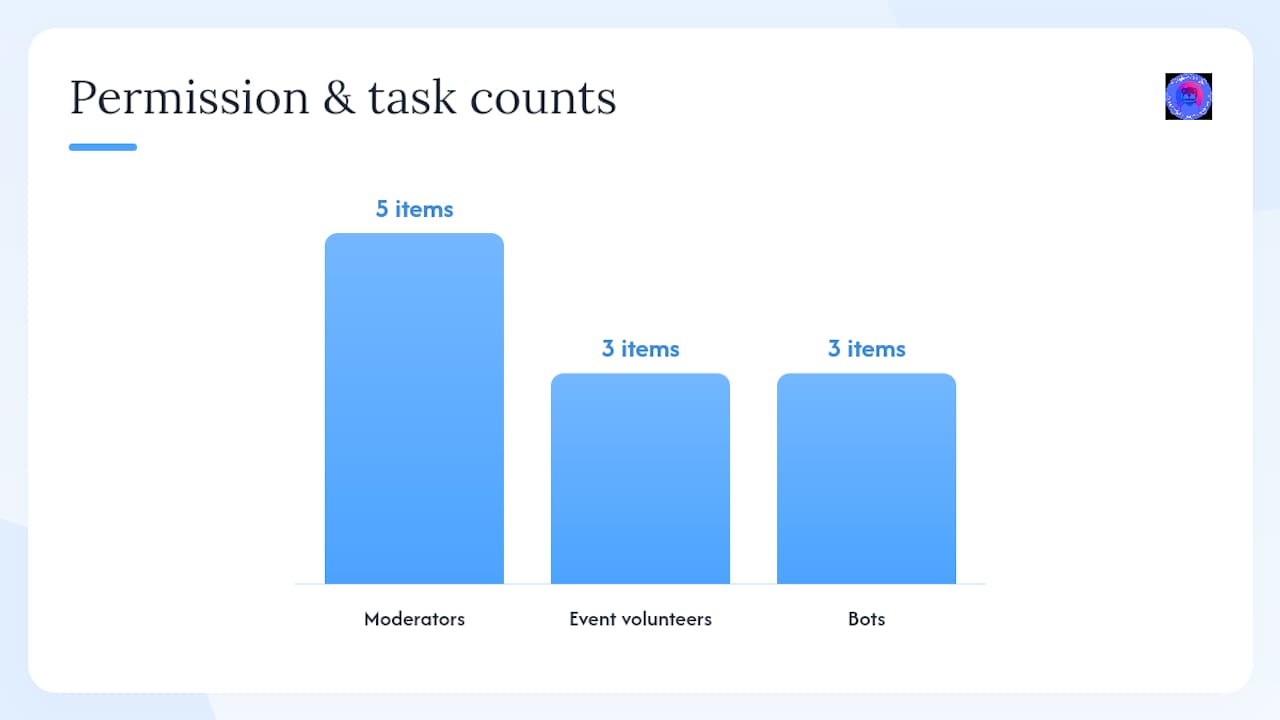
- Moderators: kick, ban, manage messages, manage roles, view audit log
- Event volunteers: move members between voice channels, mute individuals in voice, pin messages
For game server events, a structured permission model similar to what's outlined in GMod server setup guides applies equally here: separate admin-level controls from helper-level controls so volunteers cannot accidentally escalate actions beyond their role.
Bots can handle logging, welcome messages, and AutoMod escalation. What they should never handle alone: ban decisions, appeals, or any incident involving a credible threat.
Ready-to-copy templates: incident report, onboarding, and appeals
Incident report table (paste into your private mod channel):
| Field | What to capture | Why it matters |
|---|---|---|
| Incident date/time (UTC) | Exact timestamp of the event | Aligns with platform logs |
| Reported user display name | As shown in Discord or VRChat | Identifies the subject |
| Reported user ID | Copied via Developer Mode or in-app | Required for platform reports |
| Reporting moderator | Your display name | Accountability trail |
| Incident summary | 2–3 factual sentences, no opinion | Keeps records defensible |
| Evidence collected | List file names or links | Confirms what was preserved |
| Action taken | Warning / time-out / kick / ban | Documents the response |
| Platform report filed? | Yes / No + reference number | Tracks escalation status |
| Follow-up required | Date and assigned moderator | Prevents cases from going cold |
Moderator onboarding checklist:
- Enable Developer Mode in Discord (User Settings → Advanced → Developer Mode)
- Review the server rules, infraction matrix, and incident log format
- Join the private mod channel and confirm you can see the audit log
- Complete a test report using a dummy incident to confirm you know the steps
- Read VRChat's Trust & Safety wiki and the VRChat third-party safety guide
- Confirm your kick and ban permissions are active before your first event shift
Appeals form template:
Handle appeals in a private thread. Assign a moderator who was not involved in the original action, document the outcome, and post a summary (without personal details) to your community transparency page if your community publishes moderation updates.
Key Takeaways
Safe 18+ virtual meetups require written rules with explicit consequences, platform safety features enabled before the event, trained moderators with the right permissions, and evidence collected before any content is deleted.
| Point | Details |
|---|---|
| Written rules are non-negotiable | Publish a code of conduct with specific consequences in a dedicated rules channel before every event. |
| Capture IDs before you act | Collect Discord user IDs via Developer Mode and VRChat IDs in-app before banning or deleting evidence. |
| AutoMod supports, humans decide | Use AutoMod to flag content, but always route alerts to a moderator for final review. |
| Bystanders: extract, don't confront | Move affected members to a private instance or channel; report through platform tools rather than engaging aggressors. |
| Mello Zone Furry Community | Provides ready-to-use moderator workflows, verification, and safety resources for 18+ Discord and VRChat events. |
Why the "set it and forget it" approach to moderation fails
Most communities treat safety setup as a one-time task. They write rules on day one, enable AutoMod, and assume the system runs itself. It doesn't.
The rules that protect a 30-person art-sharing server don't automatically scale to a 300-person VRChat meetup with voice, avatars, and real-time interaction. The failure mode isn't usually a dramatic incident; it's the slow erosion of trust when members notice that the same behavior gets a warning one week and a ban the next, or that reports disappear without any follow-up. Inconsistency is the real threat to community health.
What actually works is treating moderation as an ongoing practice: regular reviews of your infraction matrix, documented appeals that feed back into your rules, and a feedback loop where members can flag gaps. Mello Zone Furry Community's Submit Your Voice page exists precisely for this reason. When members see that their input shapes policy, they trust the system enough to use it, and that trust is what keeps incidents from escalating in the first place.
The other underrated piece: moderator wellness. Volunteer moderators who handle repeated harassment reports without support burn out fast. Rotate shifts, debrief after difficult incidents, and make it clear that stepping back is always an option.
Mello Zone Furry Community has the resources you need
Running a low-drama 18+ meetup is much easier when you're not building the safety infrastructure from scratch. Mello Zone Furry Community offers a fully moderated Discord and VRChat environment with documented workflows, a trained volunteer mod team, and creator guidelines that event hosts can mirror directly in their own rules channels.
The Community Manifesto lays out the values behind every policy, and the safety and moderator documentation gives organizers a working template rather than a blank page. Whether you're setting up your first 18+ gaming night or refining an existing VRChat meetup structure, the groundwork is already here. Visit Mello Zone Furry Community to get started, or reach out directly through Ask Mello Zone if you need help with templates, moderation setup, or event planning support.
Useful sources and emergency contacts
Official platform safety and reporting pages:
- Role of Administrators and Moderators | Discord Safety
- Keeping your server & community safe
- Developing Server Rules
- Community Guidelines — Discord
- Our policies — Discord Safety
- I want to report someone — VRChat Help
- Safety Resources: A Guide for Third Parties — VRChat Help
- Trust and Safety — VRChat Wiki
U.S. emergency guidance: Call 911 for immediate physical threats, credible violence, or situations where someone's safety is at risk right now. For non-emergency follow-up (doxxing without an immediate threat, online harassment documentation), contact your local police department's non-emergency line. Save both numbers in your mod team's shared resources channel alongside the platform Trust & Safety links above.
Save these links in your private mod channel before your next event. Platform reporting pages are easy to lose track of mid-incident.
FAQ
What are the first steps for Discord event safety?
Publish written rules with explicit consequences, set your server verification level to "High" or "Highest," enable AutoMod, and assign at least two moderators with kick and ban permissions before the event opens.
How do you collect a user ID on Discord before banning?
Enable Developer Mode under User Settings → Advanced, then right-click the user's name and select "Copy ID." Do this before banning, because the ban can remove message history and make the ID harder to recover.
How do you report someone on VRChat?
Use the in-app "Report" button on the user's profile, then file a follow-up ticket through VRChat's Zendesk system and attach any screenshots or recordings you captured.
How should moderation appeals be handled on Discord?
Assign a moderator who was not involved in the original action to review the appeal, document the outcome, and respond within the timeframe stated in your rules. Consistent, documented appeals improve fairness and accountability per Discord's rule-development guidance.
Where can organizers get ready-to-use safety templates?
Mello Zone Furry Community provides moderator workflows, incident report templates, and creator guidelines at mellozone.site/creator-guidelines, and direct support is available through Ask Mello Zone.